Qwen-VL Best Practice
Table of Contents
Environment Setup
pip install 'ms-swift[llm]' -U
Inference
Infer using qwen-vl-chat:
# Experimental environment: 3090
# 24GB GPU memory
CUDA_VISIBLE_DEVICES=0 swift infer --model_type qwen-vl-chat
Output: (supports passing in local paths or URLs)
"""
<<< Who are you?
I am a large language model created by Alibaba Cloud. I am called QianWen.
--------------------------------------------------
<<< <img>http://modelscope-open.oss-cn-hangzhou.aliyuncs.com/images/animal.png</img><img>http://modelscope-open.oss-cn-hangzhou.aliyuncs.com/images/cat.png</img>What are the differences between these two pictures
The picture on the left is a cartoon image of a white sheep with brown spots,而the picture on the right is a digital painting of a white cat with gray stripes on its head, a small pink nose, and big blue eyes. The former is a photograph of a real animal, while the latter is a work of art created solely for decorative purposes. The latter also has a more delicate and cute style.
--------------------------------------------------
<<< <img>http://modelscope-open.oss-cn-hangzhou.aliyuncs.com/images/animal.png</img>How many sheep are in the picture
There are four sheep in the picture.
--------------------------------------------------
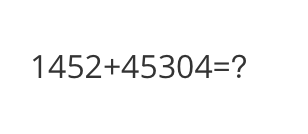
<<< <img>http://modelscope-open.oss-cn-hangzhou.aliyuncs.com/images/math.png</img>What is the calculation result
The calculation result is 45304.
--------------------------------------------------
<<< clear
<<< <img>http://modelscope-open.oss-cn-hangzhou.aliyuncs.com/images/poem.png</img>Write a poem based on the content in the picture
A lone boat on the river, gliding with ease Through the misty waters, a peaceful scene A man sits within, with a lantern to guide him, Through the dark of night, with a gentle glide.
"""
Sample images are as follows:
cat:

animal:

math:
poem:

Single Sample Inference
import os
os.environ['CUDA_VISIBLE_DEVICES'] = '0'

from swift.llm import (
    get_model_tokenizer, get_template, inference, ModelType,
    get_default_template_type, inference_stream
)
from swift.utils import seed_everything
import torch

model_type = ModelType.qwen_vl_chat
template_type = get_default_template_type(model_type)
print(f'template_type: {template_type}')

model, tokenizer = get_model_tokenizer(model_type, torch.float16,
                                       model_kwargs={'device_map': 'auto'})
model.generation_config.max_new_tokens = 256
template = get_template(template_type, tokenizer)
seed_everything(42)

query = """<img>http://modelscope-open.oss-cn-hangzhou.aliyuncs.com/images/road.png</img>How far is it to each city?"""
response, history = inference(model, template, query)
print(f'query: {query}')
print(f'response: {response}')

# Streaming
query = 'Which city is the farthest away?'
gen = inference_stream(model, template, query, history)
print_idx = 0
print(f'query: {query}\nresponse: ', end='')
for response, history in gen:
    delta = response[print_idx:]
    print(delta, end='', flush=True)
    print_idx = len(response)
print()
print(f'history: {history}')
"""
query: <img>http://modelscope-open.oss-cn-hangzhou.aliyuncs.com/images/road.png</img>How far is it to each city?
response: The sign shows the distance to four cities: mata is 14 km, yangjiang is 62 km, yangzhou is 293 km, and guangzhou is 293 km.
query: Which city is the farthest away?
response: The farthest away is guangzhou, which is 293 km according to the sign.
history: [['<img>http://modelscope-open.oss-cn-hangzhou.aliyuncs.com/images/road.png</img>How far is it to each city?', 'The sign shows the distance to four cities: mata is 14 km, yangjiang is 62 km, yangzhou is 293 km, and guangzhou is 293 km.'], ['Which city is the farthest away?', 'The farthest away is guangzhou, which is 293 km according to the sign.']]
"""
Sample image is as follows:
road:

Fine-tuning
Multimodal large model fine-tuning usually uses custom datasets. Here is a demo that can be run directly:
LoRA fine-tuning:
# Experimental environment: 3090
# 23GB GPU memory
CUDA_VISIBLE_DEVICES=0 swift sft \
    --model_type qwen-vl-chat \
    --dataset coco-en-mini \
Full parameter fine-tuning:
# Experimental environment: 2 * A100
# 2 * 55 GPU memory
CUDA_VISIBLE_DEVICES=0,1 swift sft \
    --model_type qwen-vl-chat \
    --dataset coco-en-mini \
    --sft_type full \
Qwen-VL model supports training for grounding tasks. The data should be in the following format:
{"query": "Find <bbox>", "response": "<ref-object>", "images": ["/coco2014/train2014/COCO_train2014_000000001507.jpg"], "objects": "[{\"caption\": \"guy in red\", \"bbox\": [138, 136, 235, 359], \"bbox_type\": \"real\", \"image\": 0}]" }
# mapping to multiple bboxes
{"query": "Find <ref-object>", "response": "<bbox>", "images": ["/coco2014/train2014/COCO_train2014_000000001507.jpg"], "objects": "[{\"caption\": \"guy in red\", \"bbox\": [[138, 136, 235, 359],[1,2,3,4]], \"bbox_type\": \"real\", \"image\": 0}]" }
Alternatively, you can use the <img></img> tag:
{"query": "<img>/coco2014/train2014/COCO_train2014_000000001507.jpg</img>Find <bbox>", "response": "<ref-object>", "objects": "[{\"caption\": \"guy in red\", \"bbox\": [138, 136, 235, 359], \"bbox_type\": \"real\", \"image\": 0}]" }
{"query": "<img>/coco2014/train2014/COCO_train2014_000000001507.jpg</img>Find <ref-object>", "response": "<bbox>", "objects": "[{\"caption\": \"guy in red\", \"bbox\": [138, 136, 235, 359], \"bbox_type\": \"real\", \"image\": 0}]" }
In the objects field, there is a JSON string containing four fields:
caption: Description of the object corresponding to the bounding box.bbox: Coordinates. It’s recommended to provide four integers (not floats), which arex_min,y_min,x_max, andy_max.bbox_type: Type of the bounding box. Currently supports three types:real/norm_1000/norm_1, which respectively represent actual pixel coordinates, coordinates normalized to thousandths, and coordinates normalized to a scale of 1.image: The index of the image corresponding to the bounding box, starting from 0.
This format will be converted to a format recognizable by Qwen-VL. Specifically:
{"query": "<img>/coco2014/train2014/COCO_train2014_000000001507.jpg</img>Find <ref>the man</ref>", "response": "<box>(200,200),(600,600)</box>"}
You can also directly provide the above format, but please use thousandths for the coordinates.
Custom datasets support json and jsonl formats. Here is an example of a custom dataset:
(Supports multi-turn dialogues, where each turn can contain multiple images or no images, and supports passing in local paths or URLs)
[
    {"conversations": [
        {"from": "user", "value": "<img>img_path</img>11111"},
        {"from": "assistant", "value": "22222"}
    ]},
    {"conversations": [
        {"from": "user", "value": "<img>img_path</img><img>img_path2</img><img>img_path3</img>aaaaa"},
        {"from": "assistant", "value": "bbbbb"},
        {"from": "user", "value": "<img>img_path</img>ccccc"},
        {"from": "assistant", "value": "ddddd"}
    ]},
    {"conversations": [
        {"from": "user", "value": "AAAAA"},
        {"from": "assistant", "value": "BBBBB"},
        {"from": "user", "value": "CCCCC"},
        {"from": "assistant", "value": "DDDDD"}
    ]}
]
Inference after Fine-tuning
Direct inference:
CUDA_VISIBLE_DEVICES=0 swift infer \
    --ckpt_dir output/qwen-vl-chat/vx-xxx/checkpoint-xxx \
    --load_dataset_config true \
merge-lora and infer:
CUDA_VISIBLE_DEVICES=0 swift export \
    --ckpt_dir output/qwen-vl-chat/vx-xxx/checkpoint-xxx \
    --merge_lora true

CUDA_VISIBLE_DEVICES=0 swift infer \
    --ckpt_dir output/qwen-vl-chat/vx-xxx/checkpoint-xxx-merged \
    --load_dataset_config true